Your Firm Already Pays for Claude's Best Feature. Almost Nobody Uses It.

One of the training tools I built shows a client walking away from her divorce with $8,000,000. It’s a big number, and it’s the wrong one to focus on. The number that matters sits a little lower on the page. She can actually spend about $2,795,000 of it.
Here’s why. The house is $2,150,000 of the award. Another $1,300,000 is sitting in a 401(k) and an IRA, and she can’t touch a dollar of that until a QDRO is entered and the plan signs off. She also owns 45 percent of a design firm that somebody valued at $750,000, and good luck finding a buyer for a minority stake in a small business. Line the assets up by how fast they turn into cash and she’s holding about 35 cents on the dollar for the next few years.
Most firms would put all of that in a spreadsheet. The client looks at the total in the top cell, nods, goes home, and calls back three weeks later with the question you thought you’d already answered.
So for the demo I skipped the spreadsheet and built her something she could push on.
It took one conversation with Claude, and so did each of the other three tools in this piece. Claude didn’t fight me on any of them, and I never needed a developer. I keep coming back to that, because it means the only thing standing between your firm and tools like these is that nobody has asked for them yet.
Why nobody uses this
Artifacts aren’t new. They’re on every Claude plan, even the free one, and they work in the Claude app, on desktop, and in Cowork. The only real catch is a setting called “Code execution and file creation.” If it’s switched off, you won’t ever see an artifact, whatever you ask for. It takes ten seconds to check, so go look now. I’ll wait (note that if you are on a Team or Enterprise plan your Claude admin will have to enable it).
That’s all the setup there is. Nobody has to run this past procurement.
So why isn’t everyone doing it? My guess is habit. Most of us learned Claude by chatting with it. You ask a question, it answers, and you paste the answer into Word. An artifact comes from a different kind of request. You’re asking Claude to make you something, and that just isn’t how most people have learned to use it.
Here are four examples of what happens when you do ask.
The settlement schedule
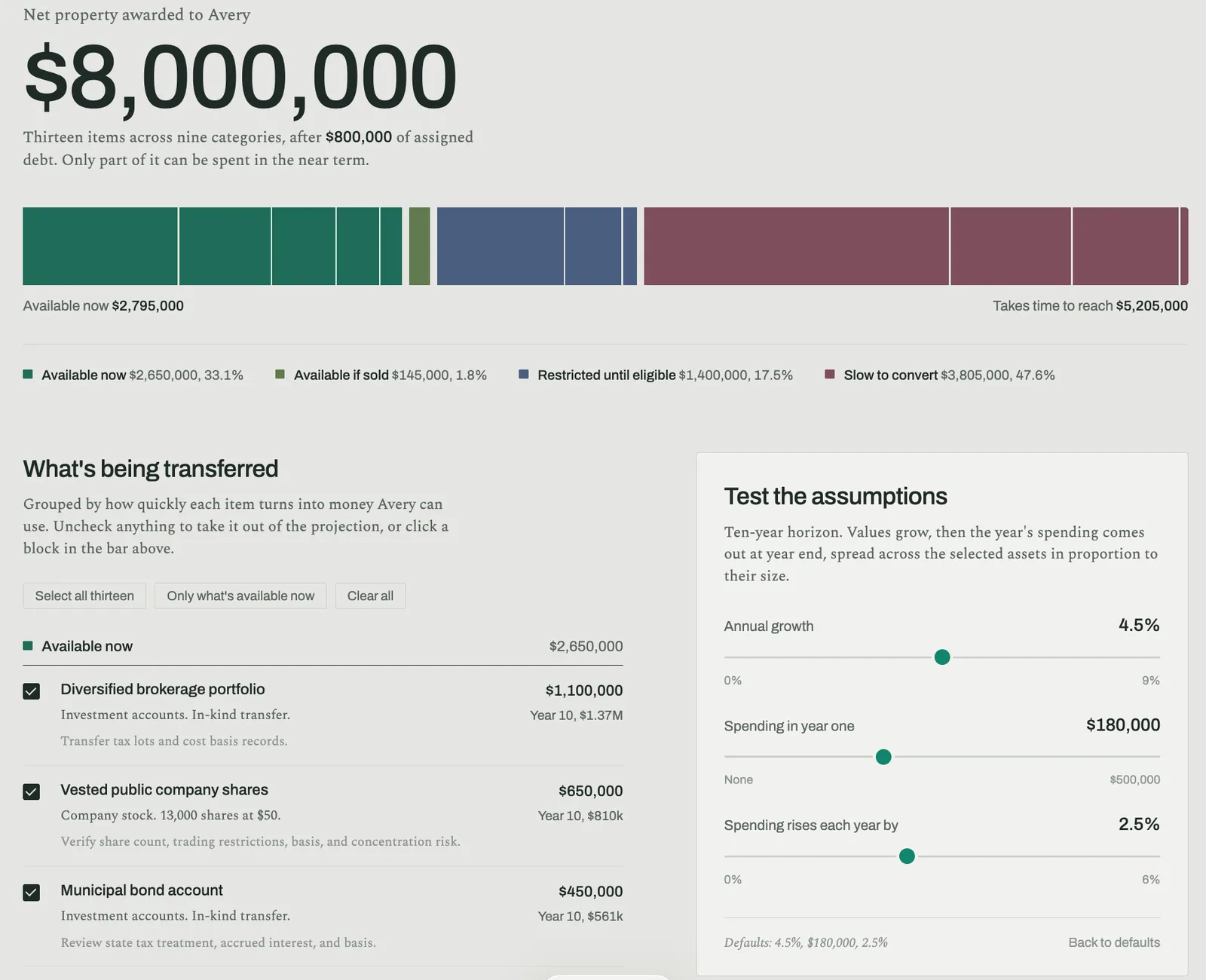
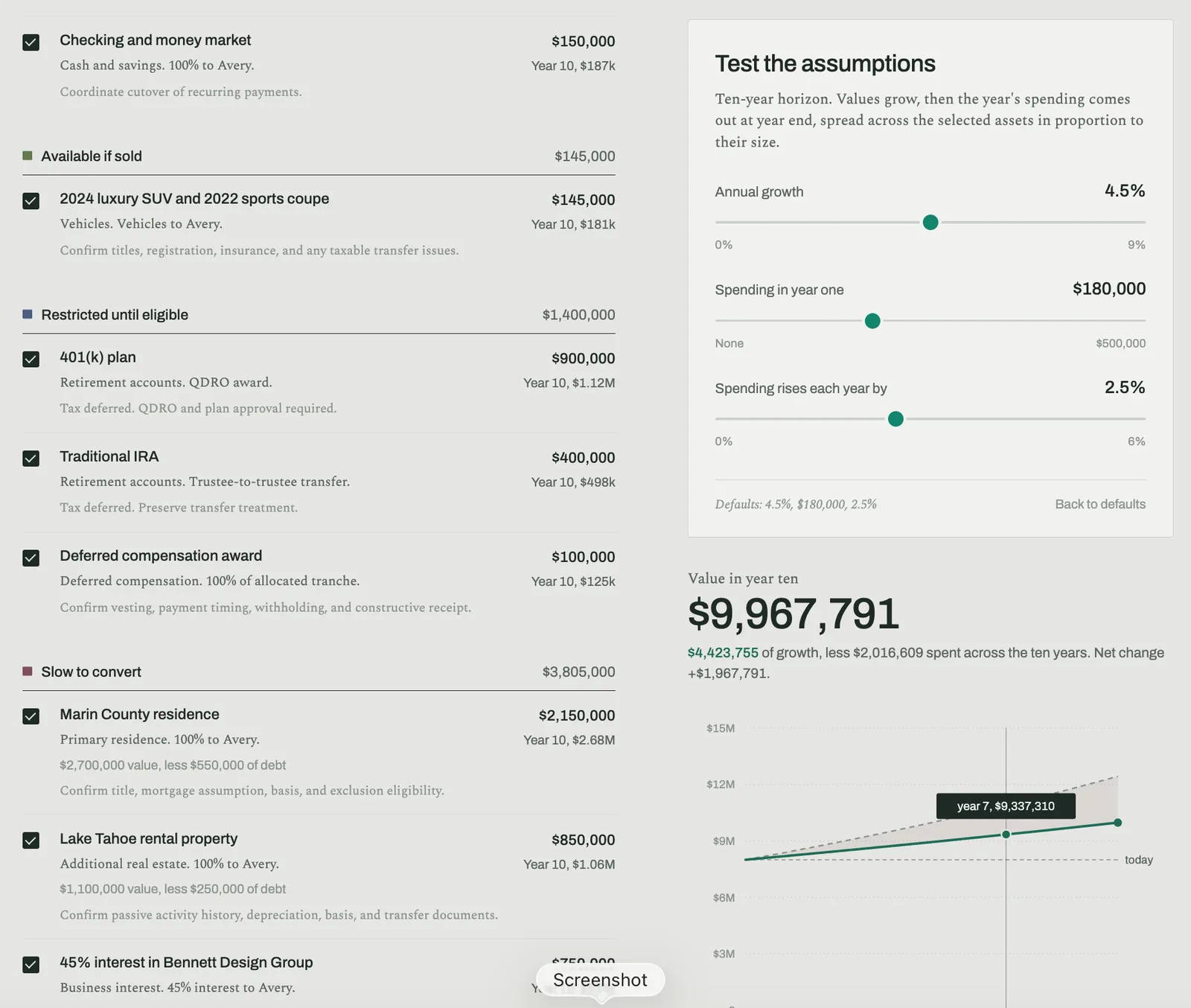
The $8,000,000 sits at the top of the page. Right under it is a single bar, split into four colors by how quickly each asset can become money she can spend. The first block, $2,650,000, is about a third of the award and it’s available right now. Next to it is $145,000 in two cars she could sell. The retirement accounts and a deferred compensation tranche add up to $1,400,000 that stays locked until she’s eligible. And the biggest block by far is $3,805,000 of slow money, which covers both properties, the business interest, and the art.
Below the bar, every one of the thirteen assets has its own checkbox. Uncheck the Tahoe rental and the whole page recalculates around the smaller estate.
Then come the sliders, and this is where it stops feeling like a document. One controls annual growth, which defaults to 4.5 percent. Another sets what she spends in year one, with $180,000 as the default. The third decides how fast that spending grows each year, and it starts at 2.5 percent. Drag any of them and the year-ten number moves right along with you. At the default settings she ends the decade at $9,967,791, after spending $2,016,609 along the way.
The chart underneath does something I didn’t design and wouldn’t have thought to ask for. It draws two lines. The lower one is her portfolio after all that spending. Above it sits the same portfolio if she’d never touched it, which reaches $12,423,755. Between them is a shaded band labeled “The gap is what the spending costs.” That gap comes to $2,455,964, even though she only spent $2,016,609. Her missing $439,355 is growth she gave up, because the money she spent wasn’t around to compound.
I don’t think a printed schedule can get that idea across. Put it on a chart that moves while you’re talking and it clicks.
Two checklists finish the page. The first gives the attorney seven things to close out before anyone relies on the numbers, like confirming valuation dates and pulling cost basis records. Then a second one lists five things the projection leaves out, and it ends with a line I’d happily frame. “One growth rate every year is a planning convenience. Markets and private company values do not behave that way.”
The chronology
Every litigator builds chronologies, and most of them end up as Word tables that nobody reads twice.
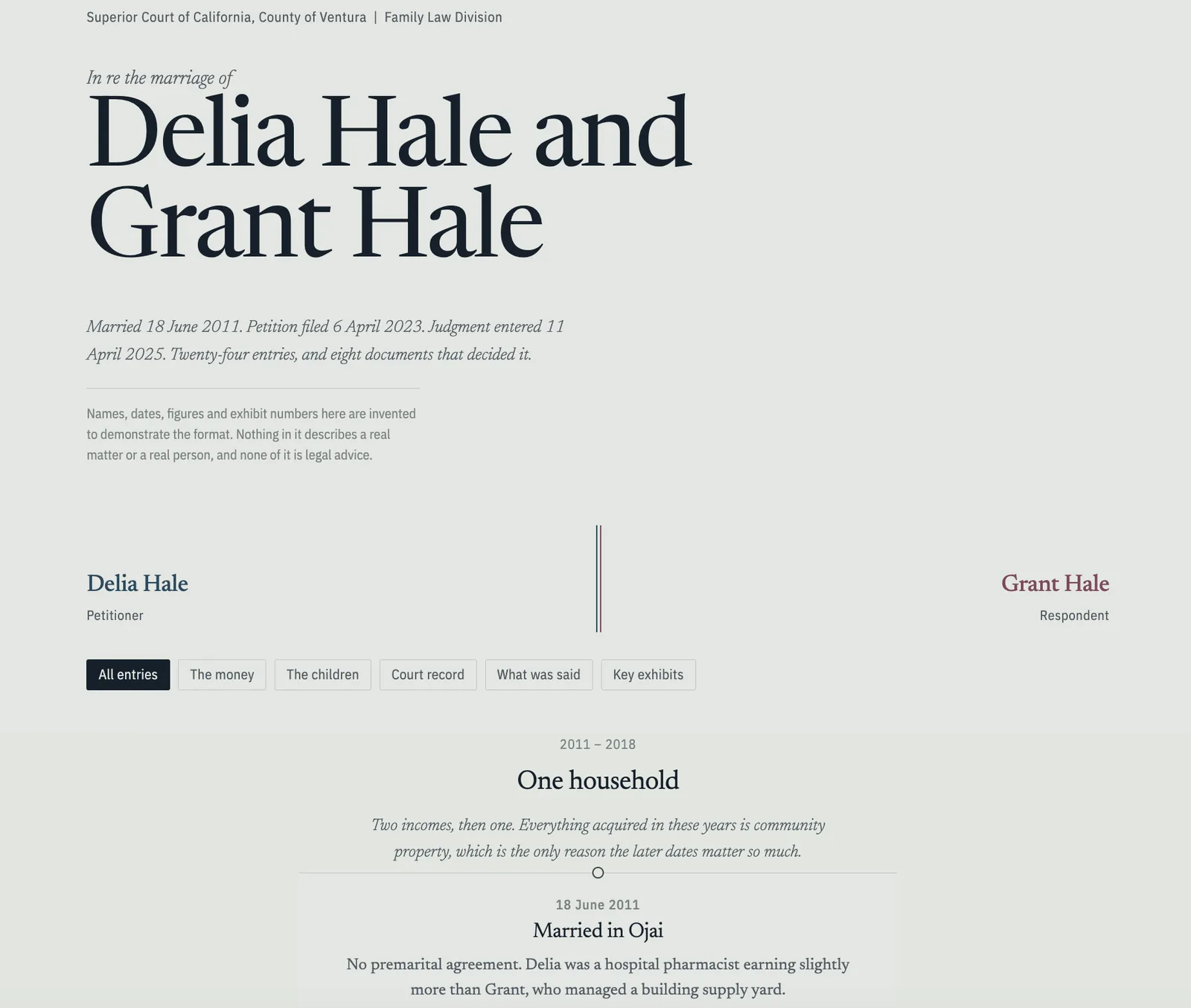
This one follows a made-up Ventura County divorce. The couple married on 18 June 2011, the petition was filed on 6 April 2023, and judgment came down on 11 April 2025. There are twenty-four entries in between.
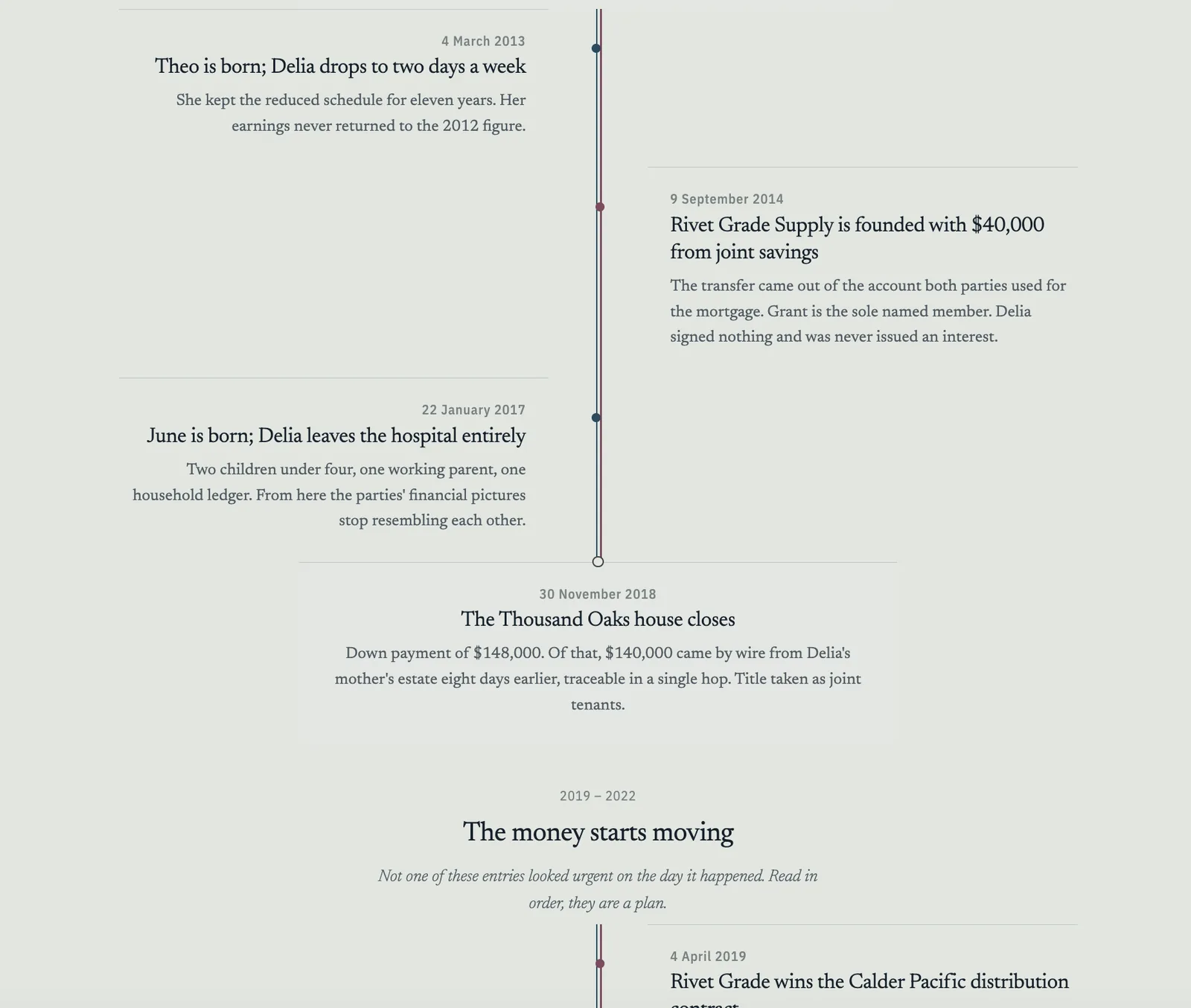
What makes it work is the layout. Delia’s events run down the left side, Grant’s run down the right, and anything they share sits on a line down the middle. On 14 February 2023, the night Grant moves into a rental in Camarillo, that middle line splits in two and never comes back together. You can see the marriage end before you’ve read a single entry.
The timeline is broken into five chapters, and each one opens with a line that says what the chapter is really about. My favorite is “Not one of these entries looked urgent on the day it happened. Read in order, they are a plan.”
The entries hold up because they’re specific. In August 2020 a second business account opens at Ojai Valley Bank, with the business yard on file as the address rather than the family home. Delia doesn’t find out it exists until November 2023. Grant’s 78-year-old mother is handed 24 percent of the company as a consultant, and nobody ever produces a consulting agreement or a single invoice. In June 2022 the house gets refinanced and $210,000 comes out in cash. The notary’s journal for that afternoon shows one appearance and one thumbprint, on a day Delia was away on a school trip in Sacramento. Every entry points to an exhibit and a Bates number, right down to Exhibit 22, notary journal page, HALE 002214.
Across the top are buttons that filter the timeline down to one thread at a time, whether that’s the money, the children, the court record, what people said, or the key exhibits. Click one and everything else drops away. That means you can prep a witness on Tuesday and a judge on Thursday out of the same file. There’s also a note in the footer that the page prints without the shading, so what you show on screen is exactly what you hand the court.
The parenting time calculator
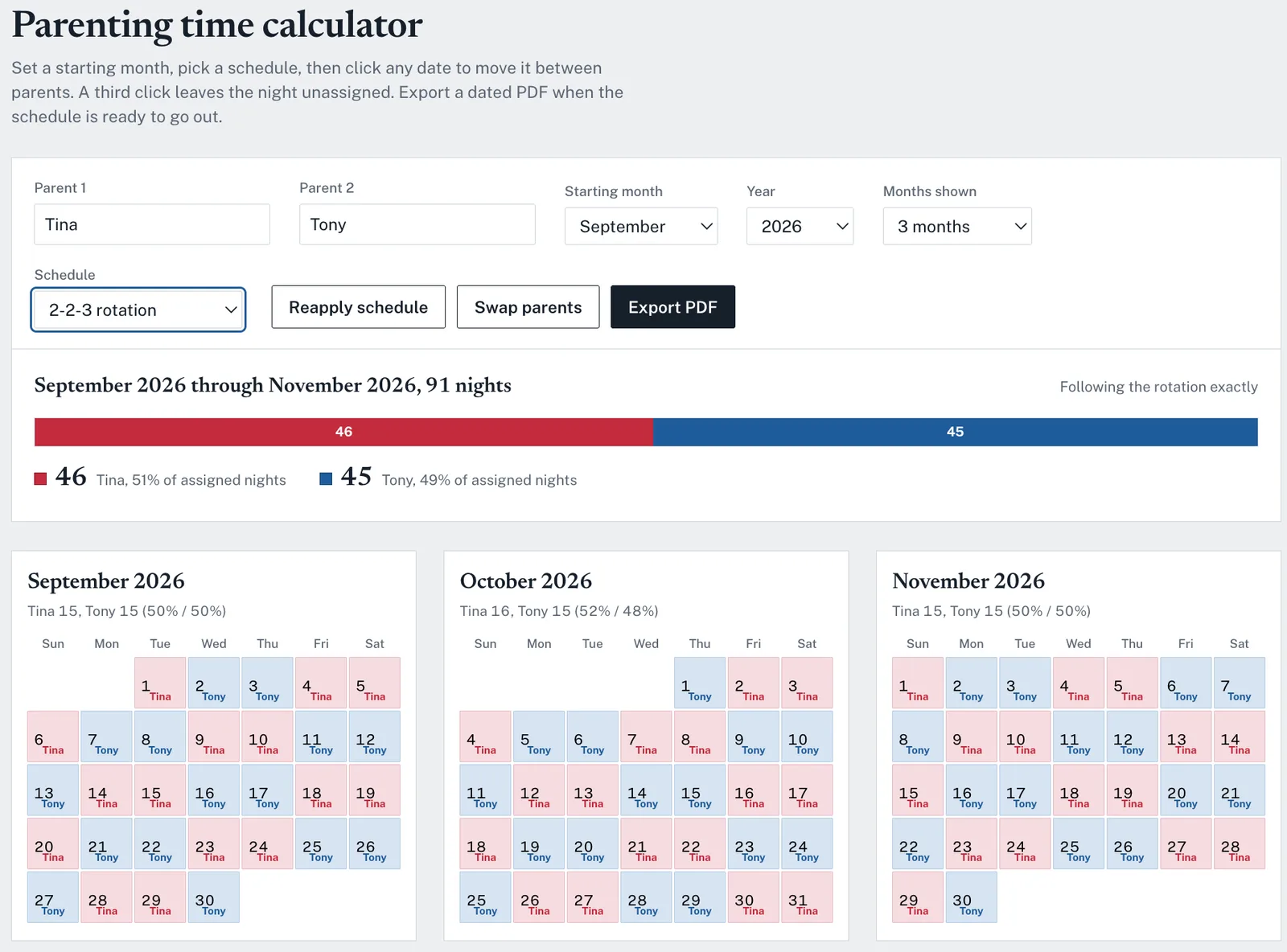
This is the least flashy of the four, and I suspect it’s the one family lawyers will get the most use out of.
In a lot of states, overnight percentages drive the support math, and counting nights by hand across a whole year is tedious and easy to get wrong. Here you type in both parents’ names, pick a starting month, and choose a rotation, whether that’s week on and week off, two-two-three, or five-two-two-five. The calendar fills itself in with each night colored and labeled, and a bar across the top keeps a running count. For September 2026 it comes out to 16 nights for Mom and 14 for Dad, or 53 and 47 percent.
Clicking a date moves it to the other parent. Click it again and it goes back, and a third click leaves the night unassigned so you can pull holidays out and negotiate them separately. Unassigned nights don’t count toward either parent, which keeps the percentage honest.
There’s also a “Swap parents” button that flips the whole schedule in one click. When the other side proposes the mirror image of your plan, you can just put it up on the screen.
At the bottom you can add a case caption, a “prepared by” line, and notes that print on the first page. Hit Export PDF and you’ve got something you can hand a client. One warning. Nothing you type gets saved anywhere, so export before you close the tab.
The case timeline
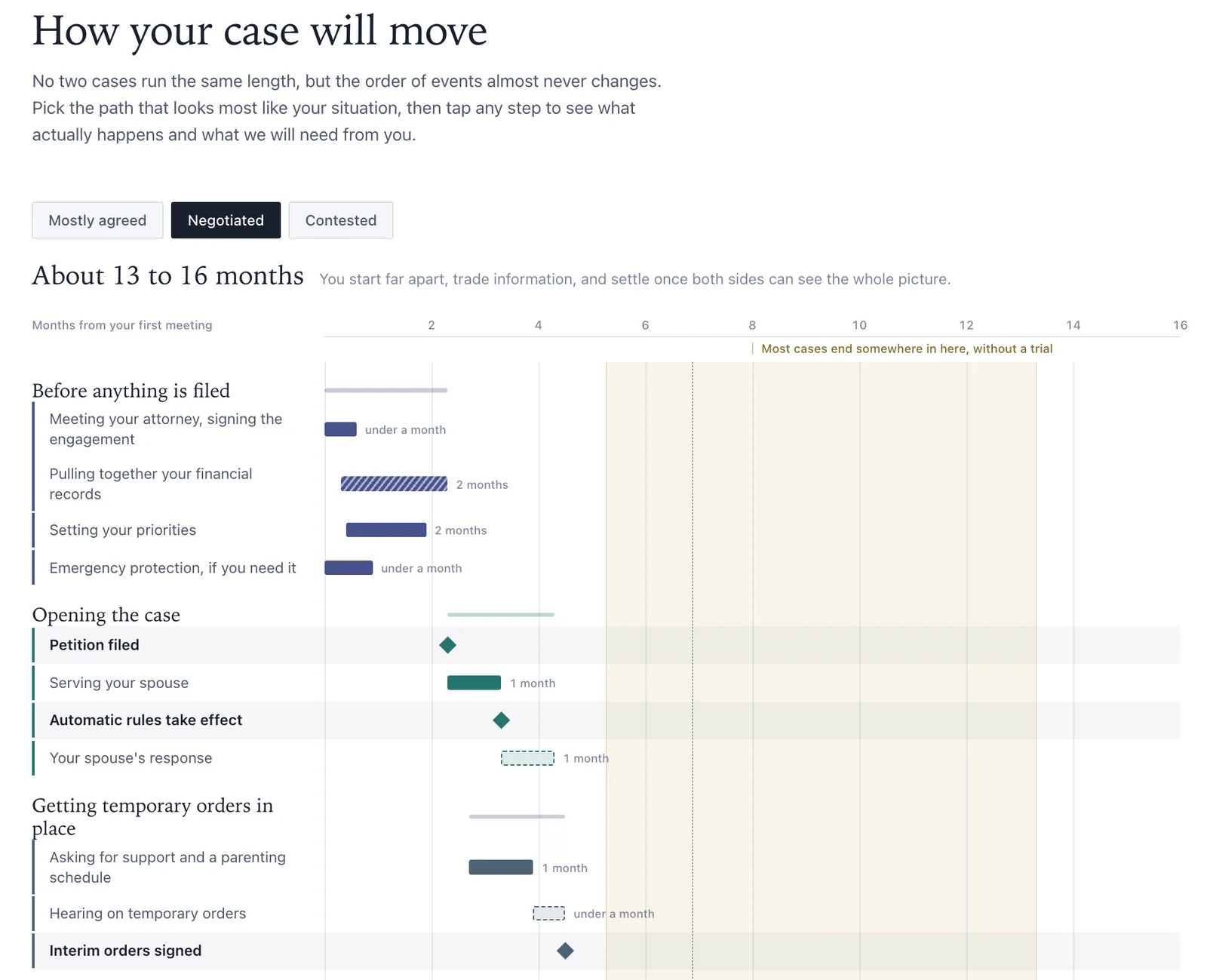
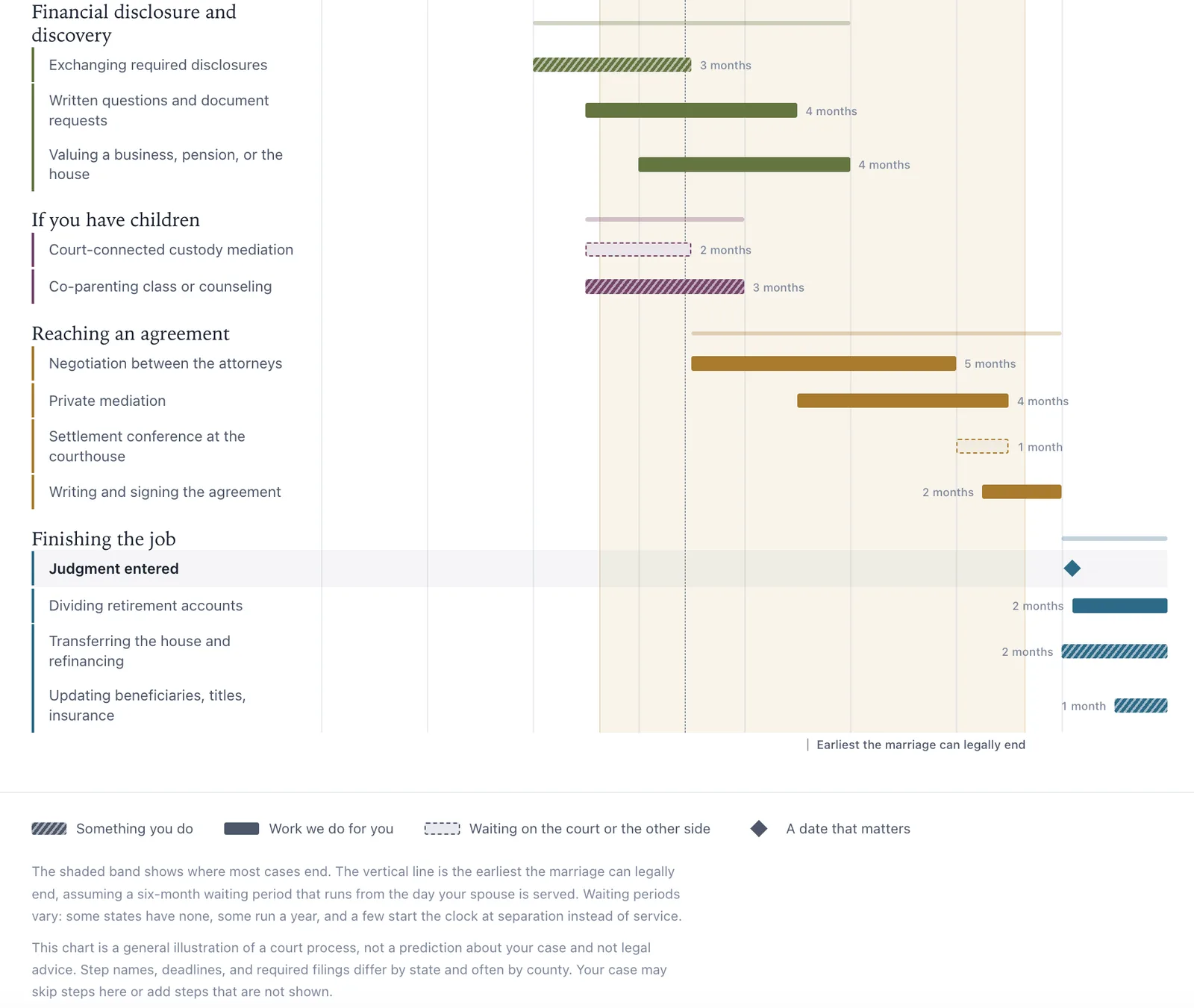
Clients ask two questions in the first meeting. How long is this going to take, and what do you need from me? Most firms answer the first one badly and the second one in a four-page letter.
This tool is called “How your case will move,” and it has a spot for the firm’s name in the corner and the client’s name up top. Three buttons let you pick the path the case is likely to take. Mostly agreed runs about 8 to 10 months. Negotiated takes 13 to 16. Contested is two years, sometimes more. Pick one and the whole timeline rescales, so the axis can run as short as ten months or as long as twenty-seven.
Down the left side are seven phases, from “Before anything is filed” through “Finishing the job.” A shaded band marks where most cases end without a trial, and a dotted line shows the earliest the marriage can legally end.
The legend is the smartest idea in any of these four tools. Hatched bars are things the client has to do. Solid bars are work the firm handles. A dotted outline means everyone is waiting on the court or the other side, and a diamond marks a date that matters. So the client’s second question gets answered before they ask it. They look at the chart and they can see which bars belong to them.
Every step opens up when you tap it. Here’s what the financial records step says, word for word. “The biggest job you personally own, and the one that most often slows a case down. Three years of tax returns, recent pay stubs, every bank and credit card statement, retirement and brokerage statements, the mortgage file, and a list of debts. Start a shared folder on day one.”
The step I’d put in front of every new client covers the automatic orders that kick in once a spouse is served. I think it’s the most expensive thing clients misunderstand about a divorce. It starts with “In most states, service freezes the big moves for both of you,” and then explains what’s frozen. That includes selling or borrowing against property, emptying accounts, cancelling a spouse’s health insurance, and taking the kids out of state. It ends with the line that matters most. “These bind you too, so call us before any large transaction.”
If you only build one of these, make it this one. The settlement schedule and the chronology have to be rebuilt for every matter, and the parenting calculator only helps if you practice family law. The case timeline is a template. You build it once with your firm’s name, your state’s waiting period, and the phases you actually use, and every new client in that practice area gets it at the first meeting for the rest of the year.
Where this goes wrong
Publishing an artifact makes it public. Anyone with the link can open it and use it, and they don’t need an account to do it. On Team and Enterprise plans, the Share button keeps it inside your organization instead, and if the artifact came out of a project, people also need access to that project. Those two buttons do very different things, and sooner or later someone at your firm is going to click the wrong one. Decide on the rule before that happens.
Everything in these four tools is made up, names and numbers included, because I built them for a training room. Each one has a disclaimer on the page, and it’s there for a reason. When something looks finished, people rely on it. If a client models ten years of spending on a tool their lawyer gave them, they’re going to feel like they got financial advice, and it won’t matter much that nobody meant it that way.
Then there’s the math. Claude wrote the calculations in that settlement model. The year-by-year table puts every year’s growth and spending on its own row, so you can check it line by line, and you should, every time, before a client sees it. How easily the tool came together is exactly why this matters. A smooth build tells you nothing about whether the numbers are right.
Last thing. An artifact is a living document. When you republish it, the link everyone already has starts showing the new numbers. If a client is holding a printout of last month’s figures while you’re looking at this month’s, you’ve got a problem, and a dated PDF export would have prevented it.
What to do Monday
Open your settings and turn on code execution and file creation. If you’ve been using Claude for a year and never seen an artifact, this is probably why.
Find the document your firm sends most often that also generates the most follow-up calls. Ask Claude to build it as a tool the client can use rather than a document they read, and use those exact words.
Write your firm’s sharing rule in one sentence and send it to everyone who uses Claude. Publish means public. Share means internal.
This is already sitting in software your firm pays for, and hardly anyone has touched it. That won’t last, and I’d rather you got there first.
Thank you for reading! If you enjoyed this article, please share it with others!
Please note: I’m on holiday this week and I had this article prepared to go before I left - so finally hitting the button to publish it. I know there have been new model releases and other announcements this week and I will cover those next week when I’m back in the office (and will resume with more pictures of Magnus again too!).